
Blend Tab
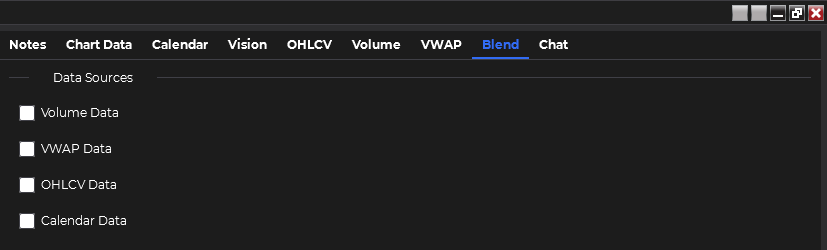
The Blend tab is a powerful and unique feature that allows you to combine multiple data sources for comprehensive analysis. This tab enables you to leverage the strengths of different data types in a single prompt, providing a more holistic view of the market.
Key Features
Section titled “Key Features”Data Source Integration
Section titled “Data Source Integration”Combine data from multiple tabs in a single analysis:
- Volume Profile data
- VWAP data
- OHLCV data
- Calendar data
Flexible Data Selection
Section titled “Flexible Data Selection”- Choose two or more data sources for each analysis
- Customize your data combination based on your specific analytical needs
Real-Time Data Capture
Section titled “Real-Time Data Capture”- The Blend tab captures the exact data currently displayed in each selected tab
- Filtered data (e.g., in the Calendar tab) will be sent as filtered
Using the Blend Tab
Section titled “Using the Blend Tab”-
Select Data Sources Choose two or more data sources from the available options (Volume Profile, VWAP, OHLCV, Calendar).
-
Review Selected Data Ensure that the data displayed in each selected tab is what you want to analyze.
-
Formulate Prompt Craft a specific prompt that leverages the combined data sources. For example: “Analyze how the current VWAP levels relate to the volume profile structure, and how this might be influenced by today’s economic calendar events.”
-
Select Provider and Model Choose a configured provider and model for analysis.
-
Initiate Analysis Click the “Analyze Blended Data” button to submit your prompt and the combined data for AI processing.
-
Review AI Response Read the AI’s interpretation and analysis of the blended data in the response section.
-
Convert to Speech (Optional) Use the text-to-speech feature to listen to the AI’s response.
Best Practices
Section titled “Best Practices”- Strategic Data Combination: Choose data sources that complement each other for more insightful analysis.
- Context-Aware Prompts: Craft prompts that specifically address relationships between different data types.
- Iterative Analysis: Use the insights from one blended analysis to inform the next, refining your understanding progressively.
- Balance Complexity: While it’s possible to combine all available data sources, sometimes less is more. Start with two or three sources and add more if needed.
- Cross-Timeframe Analysis: Leverage the multi-timeframe nature of VWAP and OHLCV data in conjunction with current Volume Profile for comprehensive analysis.
Advantages of Blended Analysis
Section titled “Advantages of Blended Analysis”- Holistic Market View: By combining multiple data sources, you can gain a more comprehensive understanding of market conditions.
- Correlation Discovery: Identify non-obvious relationships between different market aspects.
- Enhanced Decision Making: Use the synergy of multiple data types to make more informed trading decisions.
- Customized Analysis: Tailor your data combination to your specific trading strategy or market focus.
- Efficient Workflow: Analyze multiple data sources in a single prompt, saving time and streamlining your analysis process.
By mastering the Blend tab, you can elevate your market analysis to new levels, potentially uncovering insights that might be missed when examining each data source in isolation. This powerful feature exemplifies the unique capabilities of this NinjaTrader add-on in leveraging AI for sophisticated market analysis.